
The product shipped. The customer received it. Something did not work.
They looked at the packaging for a support contact. They found the email address — support@techproduct.io — printed in a small font near the barcode. They typed it into their mail app, wrote a brief message, and hit send.
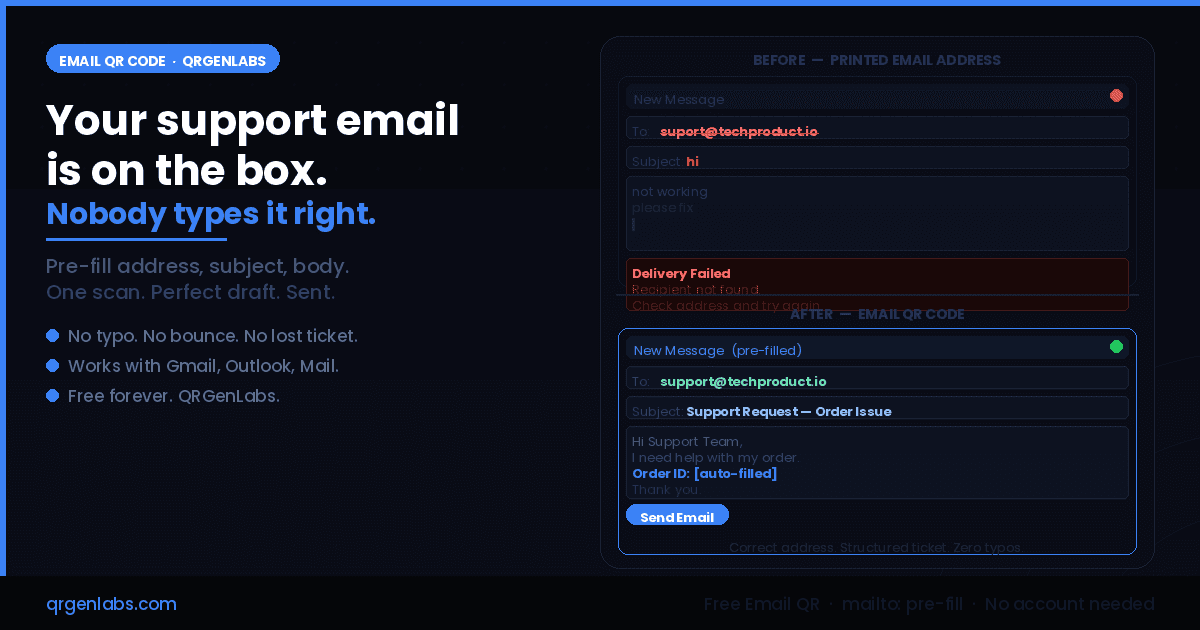
The message went to suport@techproduct.io. One missing letter. Delivery failed silently.
The customer waited three days. No reply. They assumed the company did not care. They left a one-star review. They asked their credit card company for a refund. They never contacted support again.
The support team never knew the message was sent. Their inbox showed nothing. From their perspective, the customer simply disappeared after receiving the product.
This is what a printed email address does in 2026. And it is happening to product companies, SaaS businesses, hardware brands, and service providers every single day — silently, invisibly, at a scale most teams never measure because the failures never show up anywhere.
The support email problem that nobody tracks
When a customer tries to email you and fails — because they mistyped your address, because your domain is unusual, because the @ sign did not copy correctly from a screenshot — you receive exactly zero evidence that it happened.
Your inbox shows no failed delivery notification. Your support queue shows no open ticket. Your analytics show no contact attempt. The customer simply vanishes from your systems, and you are left believing either that everything is fine or that the customer had no issue worth raising.
The reality is different. For any company that prints a support email address on physical materials — product packaging, instruction booklets, warranty cards, shipping inserts, equipment labels, event programmes, printed invoices — a measurable percentage of customers who try to reach that address never arrive.
They get one character wrong. They misread a dot as a dash. They miss the underscore. They type .com instead of .io. They copy from a photo they took of the packaging and the resolution is too low to read clearly.
The result is always the same: a failed delivery they do not notice, a support ticket that never existed, and a customer problem that was never resolved.
"The average business email address contains 22 characters. Studies on manual transcription accuracy show that humans make at least one error every 300 keystrokes. For customers under any friction — dim lighting, small screen, unfamiliar domain — that error rate climbs significantly. One character in a support address is all it takes."
What an Email QR code solves
An Email QR code encodes a complete mailto: URI directly into a scannable QR matrix, using the RFC 6068 internet standard. This URI carries three pieces of pre-filled information: the recipient address, the subject line, and an initial message body.
When a customer scans the code with any standard smartphone camera — iOS or Android, no app download needed — their native mail application opens immediately with a new draft ready to send. The recipient address is already entered, exactly as you defined it. The subject line is pre-written with whatever structure you choose. The body contains whatever starter text helps your support team triage the request.
The customer has not typed a single character of your email address. They cannot mistype it. They cannot miss a letter. They cannot confuse .io with .com. The address that arrives in your inbox is the address you encoded into the QR — perfect, every time.
The friction between "I need help" and "my email arrived in your inbox" drops to one camera gesture and one tap.
A real scenario: hardware product, missed warranty claim
Consider a mid-range electronics company that sells wireless earbuds. Their product box has a support email printed inside the lid. It is the only contact method for warranty claims.
A customer's earbuds develop a charging fault within the warranty period. They want to claim. They open the box, find the email address, type it into their phone. They misread the domain — soundsupport.io typed as soundsupport.in. The message disappears. They wait a week. Nothing.
They search for the company online. They find a Reddit thread where three other people describe the same experience. The thread title is "does this company actually respond to support?" The top comment has 47 upvotes. The brand is now associated with unresponsiveness that was never actually unresponsiveness — it was a single misread character, repeated across hundreds of customers.
Now run the same scenario with an Email QR code printed inside the lid.
The customer scans it. Their mail app opens with a pre-filled draft: recipient is correct, subject line reads "Warranty Claim — Product Issue", body starts with "Hi Support Team, I am contacting you about a product issue. Please see details below." They add two lines about the charging fault and tap send.
The support team receives a structured, deliverable, correctly-addressed email within seconds of the scan. The warranty claim is processed. The customer receives a replacement. They update their review.
The only difference is a QR code on the inside of a product lid.
What makes Email QR codes different from URL QR codes for this use case
The instinct for many product teams is to link a QR code on packaging to a contact form on their website. This solves the address typo problem but introduces a different set of friction points.
The customer has to wait for the page to load. If they have weak mobile data — common in many regions, and especially common in the moment of unboxing which often happens at home rather than near strong WiFi — the page may load slowly or fail. They have to fill in multiple fields. They may abandon the form before submitting.
An Email QR code bypasses all of this. It opens the mail app they already have, that already works, with a draft they do not have to compose. There is no page load. There is no form. There is no internet dependency. The mailto: protocol works entirely on-device — which means it works in areas with no connectivity, in airplane mode, on devices without data plans.
For equipment labels in industrial settings, for packaging that may be opened in locations without reliable internet, and for any situation where reducing steps between intent and contact matters, the Email QR is the more reliable solution.
Five use cases where Email QR codes remove friction completely
Product packaging and box inserts
The use case that opened this post. Customers who need support, want to register a product, or have a warranty question scan once and get a pre-filled draft with structured subject lines that route automatically to the right support queue.
Equipment maintenance labels
For machinery, hardware, and professional equipment — IT infrastructure, industrial tools, medical devices, smart office systems — a maintenance request QR on the equipment itself means service teams scan to raise a structured ticket without typing the facility management email or guessing the subject line format.
Event and conference feedback collection
Event programmes with an Email QR for post-event feedback, speaker enquiries, or sponsorship follow-up mean attendees can capture the contact at the event itself, with a pre-filled subject that identifies the event and date, rather than hunting for an email address after the fact.
Printed invoices and delivery notes
An Email QR on a paper invoice for returns, disputes, or billing queries routes the customer directly to accounts@yourcompany.com with a pre-filled subject line of "Invoice Query — [Invoice Number]" — removing the most common reason invoices go unpaid: the customer could not figure out who to contact.
Printed marketing materials and brochures
Brochures, catalogues, and printed adverts that want to drive email enquiries no longer have to rely on the reader typing an address. They scan. The draft opens. The enquiry arrives.
Static versus Dynamic Email QR — which one fits your use case
QRGenLabs generates both. The distinction matters for businesses thinking about print volume and whether they need analytics or the ability to change routing after print.
A static Email QR encodes the complete mailto: URI directly into the QR matrix. It works entirely offline, requires no server to be running, and is free forever on QRGenLabs with no account needed. The address, subject, and body are fixed at generation time. Use this for stable support addresses that will not change — product packaging, equipment labels, and printed materials with a defined shelf life.
A dynamic Email QR routes through a short URL, which means you can update the recipient address, subject line template, or body text after the code has already been printed. It also tracks scan analytics: how many times, from where, on which device. Use this for high-volume print campaigns, for situations where your support inbox routing may change, or when you want to A/B test subject line formats to see which produces the most structured tickets.
One practical note for static codes: keep the mailto: payload concise. Very long body templates push the QR matrix into higher version numbers, creating a denser grid that can be harder to scan on matte packaging surfaces under fluorescent lighting. Subject line plus a short body intro under 200 characters combined gives you clean, scannable output in every condition.How to create your Email QR code on QRGenLabs
Creating an Email QR code on QRGenLabs takes under a minute and requires no account for a static code.
- Go to QRGenLabs and select the Email QR type from the generator
- Enter the recipient email address — the exact address you want enquiries to arrive at
- Write a subject line template — something like "Support Request — [Product Name]" gives your team instant triage context
- Add a body starter — a brief opening like "Hi Support Team, I am contacting you about the following issue:" helps customers structure their message
- Customise the QR design — add your logo or brand colours, set error correction to High for print use
- Export as PNG for digital use or SVG for print-quality output — provide the SVG directly to your packaging or print vendor
Static Email QR codes are free forever on QRGenLabs — no account required, no expiry, no watermark.
Your support email works. Your customers just cannot type it.
The support infrastructure most product companies build is solid. The email arrives in the right inbox, gets triaged, gets resolved. The weak point is not the inbox — it is the twelve-character string of letters, numbers, and symbols that stands between the customer's intent and your inbox.
Printing it on packaging and trusting customers to type it correctly under real-world conditions is a bet with measurable losses: lost tickets, missed warranty claims, unresolved issues, and customers who leave negative reviews about unresponsiveness that was actually a typo.
An Email QR code removes that bet entirely. The address transfers from your QR to their draft without any human transcription. The subject line is structured. The draft is ready to send. The ticket arrives.
One scan. That is the entire distance between a frustrated customer and a resolved support request.
Create your free Email QR code at QRGenLabs — no account, no expiry, ready to export before your next print run.